Writing again about technology sovereignty, this post might be a little jargon rich, however it is worth it nonetheless, as many innovative solutions have ’evolved’ in recent years to both secure our private services, and also make them easy to access.
Preamble
In modern days, most internet access/usage occurs on a smartphone, either out on the wild internet via a cell phone IP service, or on a WiFi network. That WiFi network might be the users home network, or it may be a coffee shop, a local council ‘Free’ WiFi hotspot, or maybe a villain trying to man-in-the-middle your traffic. Whatever the case, the IP traffic is almost certainly behind a NAT router somewhere.
Network Address Translation (NAT) and its implementation on IP routers, masquerade traffic from a ‘private’ IP subnet on one side, out the ‘public’ IP address on the other. This is one of the workarounds developed by internet engineers to overcome the shortage of publicly addressable IP addresses in on the IPv4 internet. When originally developed in the 1970s, it was never envisaged that every lightbulb may need internet access.
Masquerading involves your WiFi router stripping your source IP address from the IP datagram being forwarded onto the internet, replacing it with it’s own public IP address. The router needs to keep a track of these masqueraded connections for the return traffic.
NAT has some benefits, in that devices on the private side can punch out to the devices/services on the internet, but it is hard to ‘see’ them from the outside. This provides some modicum of security, but is often a false sense of security.
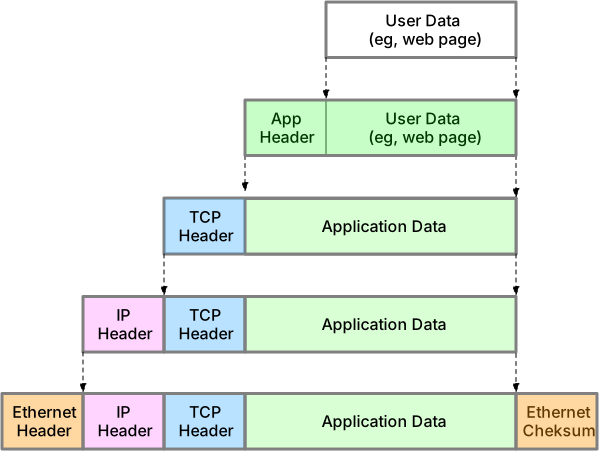
Internet ‘connection’ example: a web server listens on its IP address on TCP port 80. When a connection is made to that server, the network packets traversing the internet have metadata, encapsulating the payload, which describes both endpoints. The source IP address, with source TCP port, and the destination IP address with destination TCP port.These are added, inspected and stripped by different software layers on various devices between you, and the server/device your connecting to.
Now the NAT WiFi router only has one real-world publicly addressable IP address, and that is what is in the metadata traversing the internet to the web server you’ve made a connection to. Because the private, non-routable IP addresses are just that.
Your WiFi IP subnetwork might be 192.168.1.0/24, but so might your neighbour’s, and your parents in another city.
For the most part this just works, as many people do not run web servers on their home network, or rarely need to reach back into that network when they’re out and about. Mainly they and the apps on their devices want to connect to services running on the public internet.
There is an analogy here to the human body; how we are just one of the many lifeforms inhabiting our body, which is mainly a vessel for uncountable swarms of bacteria, viruses and parasites. In many ways so now are the computers we carry around in our pockets. We may want to check our TikTok feed, but the apps and their multitude of software subunits also want to ‘dial-home’ and report on our whereabouts, internet usage and presence of other apps etc.
Now supposing you do want to connect to a service running on a computer you manage, which is probably sitting on a private IP subnet somewhere. For example a private file server or a [Home-Assistant.io] instance.
Well there are workarounds for this use case, none of which are elegant, nor particularly secure. Your service could punch out to a third party service, creating an established connection through your WiFi routers’ firewall, masquerading the TCP/UDP port, which are then registered with the third party. This is how voice over IP (VoIP) generally works, with your home phone making an outbound TCP/UDP connection to a STUN server, then making another connection with it’s discovered real-world IP address to your VoIP provider.
Another method, is configuring your WiFi router to listen the public interface, on some TCP/UDP port number you decide, say 81, and forward that to your internal web server on port 80. It works just fine, but requires some fiddling that most people are uninterested in configuring.
Yet another method would entail you running a virtual private network (VPN), that you dial in to from wherever you are on the wild internet. This establishes another interface on your mobile that appears to be on your home network, with whole TCP/IP packets with their source/destination headers themselves encapsulated within other TCP/IP packets as they tunnel across the internet to your home WiFi router. The web server more or less thinks it is serving a connection to another device on its home subnet.
Finally, another increasingly common method involves the newer solution to the shortage of public IP addresses in the IPv4 internet, and that is with the newer, less widely employed, IPv6 internet.
There are enough IPv6 addresses available for every even inconceivable device to have public internet access without NAT and IP masquerading. In fact many mobile cell IP services only use IPv6.
This is the case for example on the dominant Australian telco, Telstra. If your phone is configured to use the
telstra.wapAPN, it will only be issued with a temporary IPv6 IP address. If on the other hand you use thetelstra.internetAPN, you will get both an IPv4 and and IPv6 address (should your phone ask for them). When you configure an iPhone to mobile hotspot, your phone might be configured to use the APN so your phone can offer its own NAT/masquerading WiFi to other IPv4 devices.Should you try and web-surf to http://ipv4only.website.com the cell carrier employs some trickery with DNS and NAT to deliver IPv4 content to your IPv6 connection, but this obviously fails if you bypass DNS with an IPv4 address url, such as http://104.22.67.195
Yea!, A beautiful, modern solution
Like so many components of the modern internet, there are a few services which introduce yet more failure domains than one may desire. For example; DNS which enables us, and our bacteria like app substrates, to look up names for services. DNS itself has servers including root servers, which whilst reasonably resilient, themselves constitute a failure domain. As do certificate authorities, and BGP route tables etc.
I rely on a few optional ones to facilitate this excellent, elegant solution to the engineering ‘problem’ of wanting to host my own services, often behind residential internet services. These are mostly free for the scale I use, and where I pay for, it is less than the cost of a cup of coffee per month.

Cloudflare, is a globally distributed internet infrastructure company, which hosts my DNS domains which I used to buy from the excellent hover.com, however recently noticed that Cloudflare themselves sell some domains, including the short Australian .cc domain. Hover charged about $30/pa, yet Cloudflare sold it to me for $8/pa. (eg, home.cc)
Cloudflare has an excellent API that lets you programmatically register, IP addresses to hostnames that their infrastructure will resolve for you, and the whole world for that matter. (eg, mynas.home.cc --> 192.168.1.5)
NAS: a computer running Network Attached Storage (NAS) software, provides access to that storage, and often other services, across a network.
Cloudflare’s APIs can also employed by tools that make use of the Automatic Certificate Management Environment (ACME) protocol, which is a communications protocol for automating interactions between SSL/TLS certificate authorities. Let’s Encrypt, ZeroSSL and other providers will issue on demand a certificate for your service that is tied to their certificate authority (CA), enabling you to securely make SSL/TLS connections in knowing the payload has not been compromised.
Now you can connect to your service with a SSL certificate that your web browser will trust, because it has been issued by a known CA. Increasingly web browsers and apps that make use of HTTPS will not connect to a service if the certificate does not match the domain name, as is often the case with ‘self-signed’ certificates.
ACME certificate providers will not issue a home.cc certificate to anyone of course as that would defeat the purpose. They need some way of knowing the tool using the ACME protocol asking for mynas.home.cc is entitled, and this is where Cloudflare comes in.
Cloudflare gives you, the owner of home.cc a token, that lets you programmatically create DNS records in their database. When your ACME tool does this, creating say, _temprecord_4CD25126.home.cc, it then tells the certificate provider to look for that record on the public DNS, proving you the operator of the tool, to be the owner of the domain name.
Now your server behind your WiFi router on a private IP address, is issued a certificate for https://mynas.home.cc.
Anyone can type that into their web browser, but a connection will not be made as their DNS lookup will still return 192.168.1.5, which they have no way of connecting. If you were out on the wild public internet, absent a VPN connection to your home WiFi LAN, you too could not make the connection.
ZeroTier, is another globally distributed infrastructure company, similar to Cloudflare, ZeroSSL and VoIP providers, but the service you rely on they offer is more akin to STUN and a private database your devices query to use their incredible offering.
ZeroTier is similar to a VPN, but is so much more. Typically VPNs are more like modems doing PPP. That is; hub and spoke, back to a central VPN server, virtualising down the spokes. ZeroTier is more like a peer to peer mesh of endpoints and off-ramps, with almost zero configuration.
Upon creating an account, free for up to 50 ‘members’/devices, you create a virtual private network using a non-publically routable IP subnet of your choosing. (eg, my_network_id: 2B1CED6B413D 192.168.222.0/24)
Your software instances/members of ZeroTier then make peer-to-peer connections with other instances/members of your network, on demand, encapsulating your new 192.168.222.0/24 traffic.
Furthermore, when;
- Your software instances of ZeroTier is installed on a WiFi router (eg, ZeroTier IP:
192.168.222.254), which is just a specialised computer with network interfaces in multiple networks, that forwards IP packets from one network to another, and - You configure that instance to be the gateway for your home LAN subnet.
Then any of your devices with ZeroTier installed can reach beyond your WiFi router into your LAN. https://mynas.home.cc, which is on 192.168.1.5 can be seamlessly and securely connected to, from anywhere. What is more, if you have configured ZeroTier on another WiFi router with your network_id, say at your parents house, (assuming that WiFi LAN does NOT also use the same IP subnet 192.168.1.0/24 locally), then LAN devices on either side can reach each other without any configuration on those specific devices. Your mother’s laptop, on her WiFi LAN can resolve and seamlessly connect to https://mynas.home.cc. No special configuration required on her laptop, nor on your NAS is required.
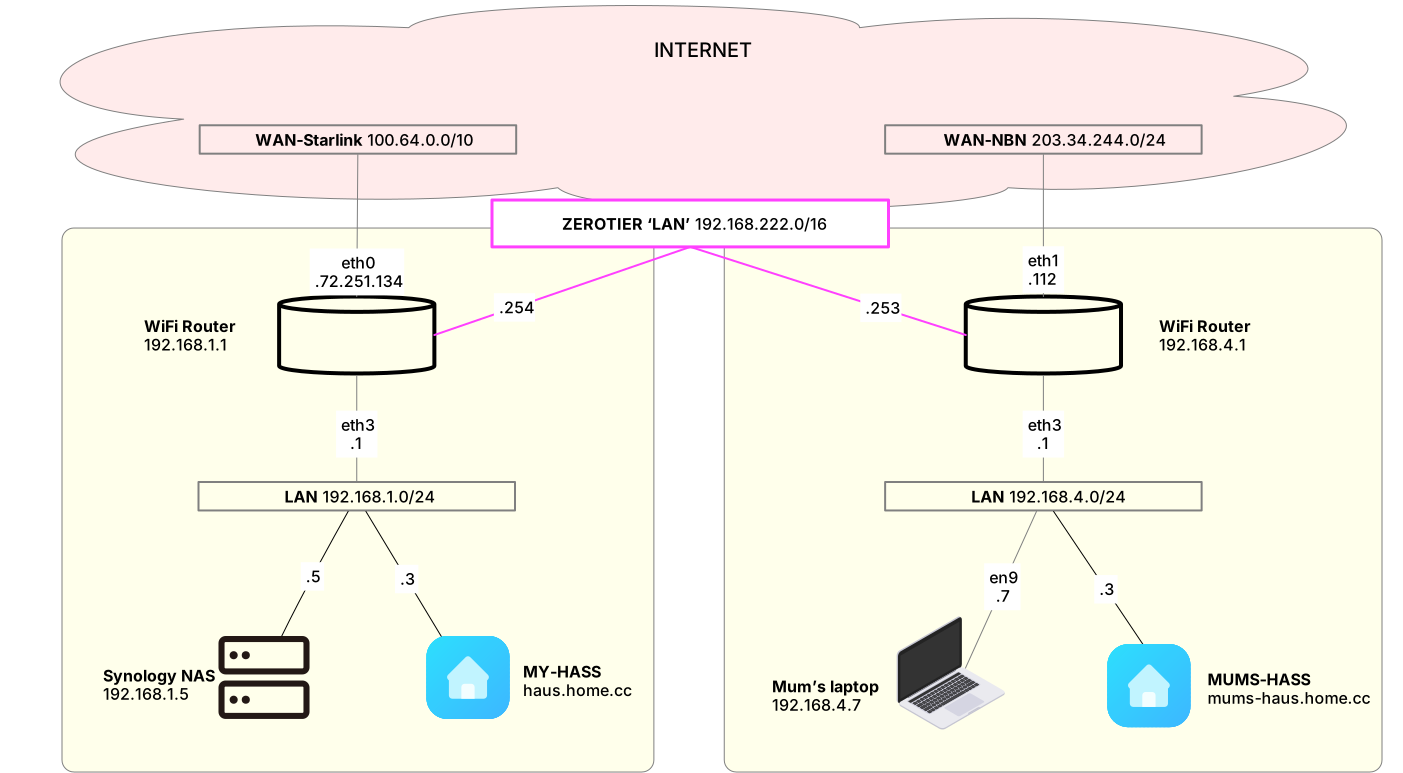
- Her laptop web browser asks it’s DHCP nominated DNS server for the IP address for
mynas.home.cc, which resolves on a different IP subnet the than her LAN, thus - Her laptop, requesting a HTTPS payload, sends the IP packet to her WiFi router
- Her router knows the
192.168.1.0/24subnet can be reached via192.168.222.254, so forwards the HTTPS/IP packet to your WiFi router, then - Your WiFi router puts the packet on its local LAN to be picked up by your NAS
mynas.home.ccreplies to her laptops private IP address, via my local WiFi router, which ‘knows’ the192.168.4.0/24subnet can be reached via192.168.222.253, with an HTTPS payload- That HTTPS payload is cryptographically verifiable, by her web-browser due to the
https://mynas.home.cccertificate being issued and signed by a known Certificate Authority.
If you wanted your mother to be able to access your NAS when she takes her laptop to work, or on airport WiFi, you simply install ZeroTier on her laptop, configuring with your network_id. Then step #3 above is removed, as her laptop makes the secure ZeroTier connection to your WiFi router, with the airport WiFi network being non the wiser.
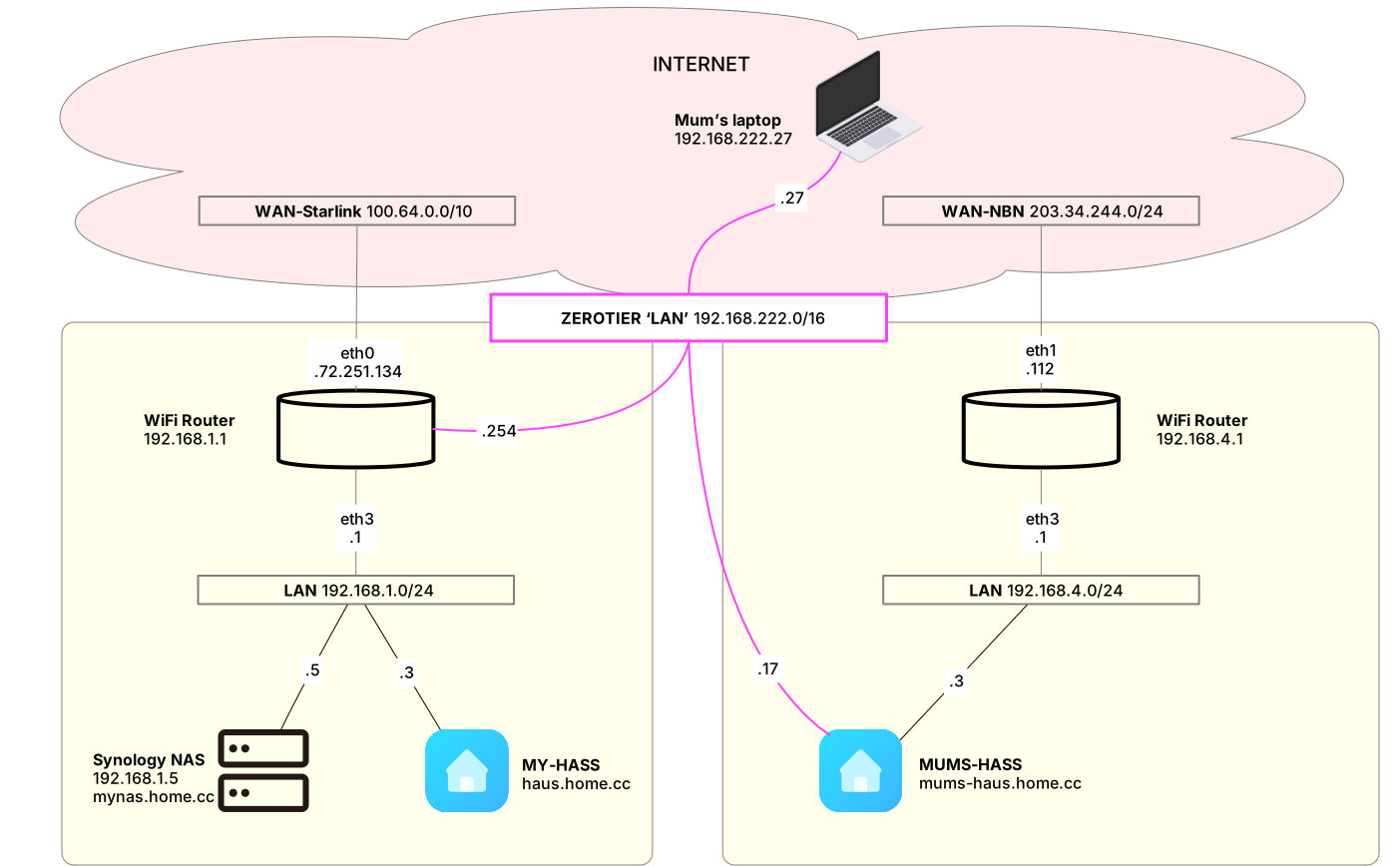
If you didn’t want to touch her WiFi router, nor her laptop, but did want access to, say her Home-Assistant.io which might be running on a Raspberry Pi, there is a ZeroTier Add-on that joins that to your network. As is there a ACME Let’s Encrypt add-on that supports DNS-01. So https://mums-haus.home.cc, is easily accessible.
Summary and other use cases
The combination of these services and associated software is quite magic.No longer do I need to configure backdoors on routers and messy port forwards. Staying within the free 50 member limit, you can have as many networks as you please. There are with various rules that can be applied to packet flow, as your mesh of software instances of ZeroTier is similar to a virtual, distributed VXLAN programable ethernet switch.
- 1990s IPX/SPX games can tunnelled across ZeroTier
Not forgetting…
As discussed in an earlier post, there is a good use case for introducing yet another failure domain into my setup, and that is with the NextDNS software/service.
NextDNS, offers domain name resolution services, as does your ISP. In fact your home WiFi router probably also runs a DNS server, usually forwarding queries to your ISPs DNS servers, and caching the results. But you can also configure a static hostname mapping on your WiFi router, so that mynas.home.cc resolves, but this is obviously local only.
There are two compelling features of the NextDNS software/service.
- Privacy, and
- Protection.
NextDNS protects your privacy in two ways. Firstly the NextDNS software you install on your devices, and/or your Wifi router, forward your DNS queries in an encrypted form, preventing your ISP and others vacuuming up the metadata surrounding your computing, which is unsold into dark pools online.
Secondly, NextDNS optionally will filter the queries, preventing known malware domains etc. from resolving. Thus TikTok will connect to their CDN to show you video, but fail to connect to, for example their biometric logging servers.
Probably a bad example. TikTok should be avoided at all cost as every interaction with the app is harvesting you for the benefit of the transnational criminal organisation that is the Chinese Communist Party
By customising the resolvers filtering of inappropriate material on kids devices for example; is another type of protection being offered, but in my view we’re all exposed to dangerous actors online, not just spammers whom want to trick us into entering our credit details into the wrong web page.
Most of the internet is not free
We are the product being sold. Our behaviour and the ability to manipulate our emotions are being traded.
Access to our feed, with curated content algorithmically designed for us, because we let ourselves be known. This laziness has enabled modern robber barons to manipulate our emotions and shape the way we think. By preventing apps and app subunits from divulging ourselves into these dark pools, we can at least protect our families to some extent.
Using services such as NextDNS and divorcing ourselves from free services, hosting our own federated content must be a path to regaining our digital sovereignty.